🚀 How to Get Access
Step 1: Create a Free Plex Account
If you don't have one, create a free account. You do NOT need Plex Pass.
Create Plex AccountStep 2: Request Access
Send me an email with your Plex Username (or email address used for Plex).
Please specify your preferred quality:
- 1080p Only: Good for slow internet or older TVs.
- 4K + 1080p: Best for high-speed internet (300Mbps+) and 4K TVs.
Step 3: Authenticate (Wait for Email)
Once I receive your request, I will email you a special Authorization Link.
You must click that link and sign in to link your account to my automation system.
⚙️ CRITICAL: Client Settings
⚠️ If you do not change these settings, movies will buffer or look terrible.
This server provides high-quality "Remux" files. You must force your device to play them Directly.
📱 For Mobile / TV Apps
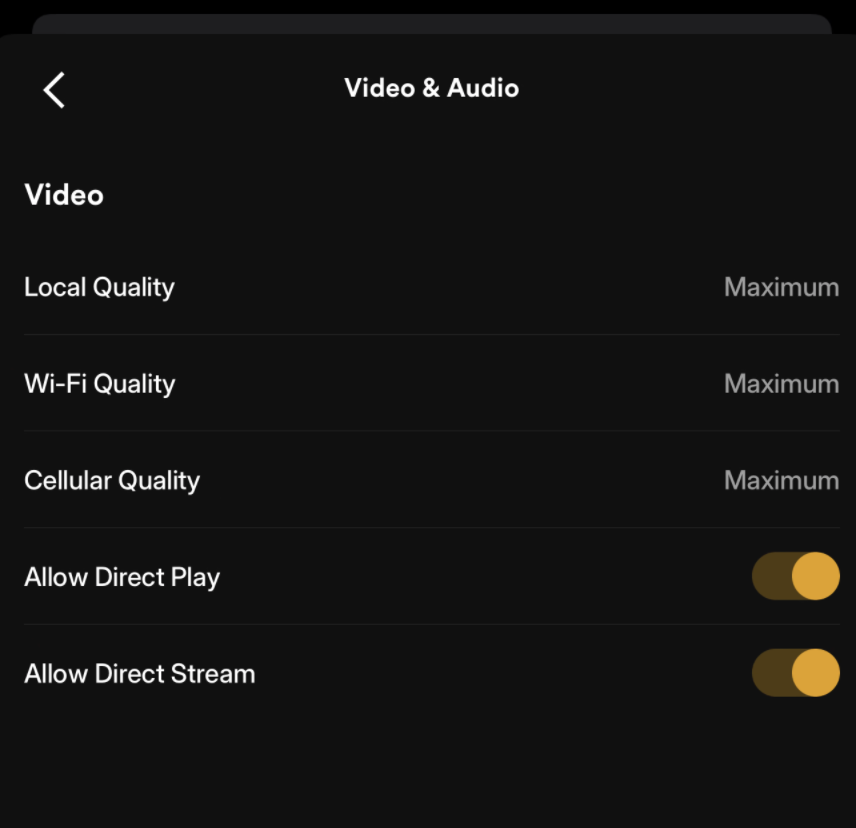
1. Video Quality
Go to Settings → Quality
- Local/Home Streaming: Maximum / Original
- Remote Streaming: Maximum / Original
- Turn OFF "Auto Adjust Quality"
2. Advanced / Player
Go to Settings → Advanced
- Allow Direct Play: ON
- Allow Direct Stream: ON
- Burn Subtitles: Automatic
📸 Visual Guide:
🍎 Apple TV / iPhone Users
If you experience buffering on 4K movies:
- Open the movie page in Plex.
- Go to Settings / Playback Settings.
- Change Audio Stream from
TrueHD 7.1toAC3 5.1orCompatibility.
(Apple devices cannot play TrueHD audio, causing the server to work too hard.)
🆘 Support
Having issues? Requesting a specific movie? Send an email.
Contact Support